PeripherAll

Windows · Ubuntu · macOS

One keyboard. One mouse. Every computer.

Share one mouse and keyboard across all your computers. Copy on one and paste on another, files included. Use any computer's microphone or camera on the others.

Coming soon for Windows, Ubuntu and macOS.

  • Only your own computers, signed in
  • Your data never leaves your network
  • Encrypted, computer to computer
  • Every keyboard layout works

See it work

It's the real app, doing real things.

Every clip on this page is PeripherAll's own window, recorded as it runs: nothing staged, nothing drawn over it.

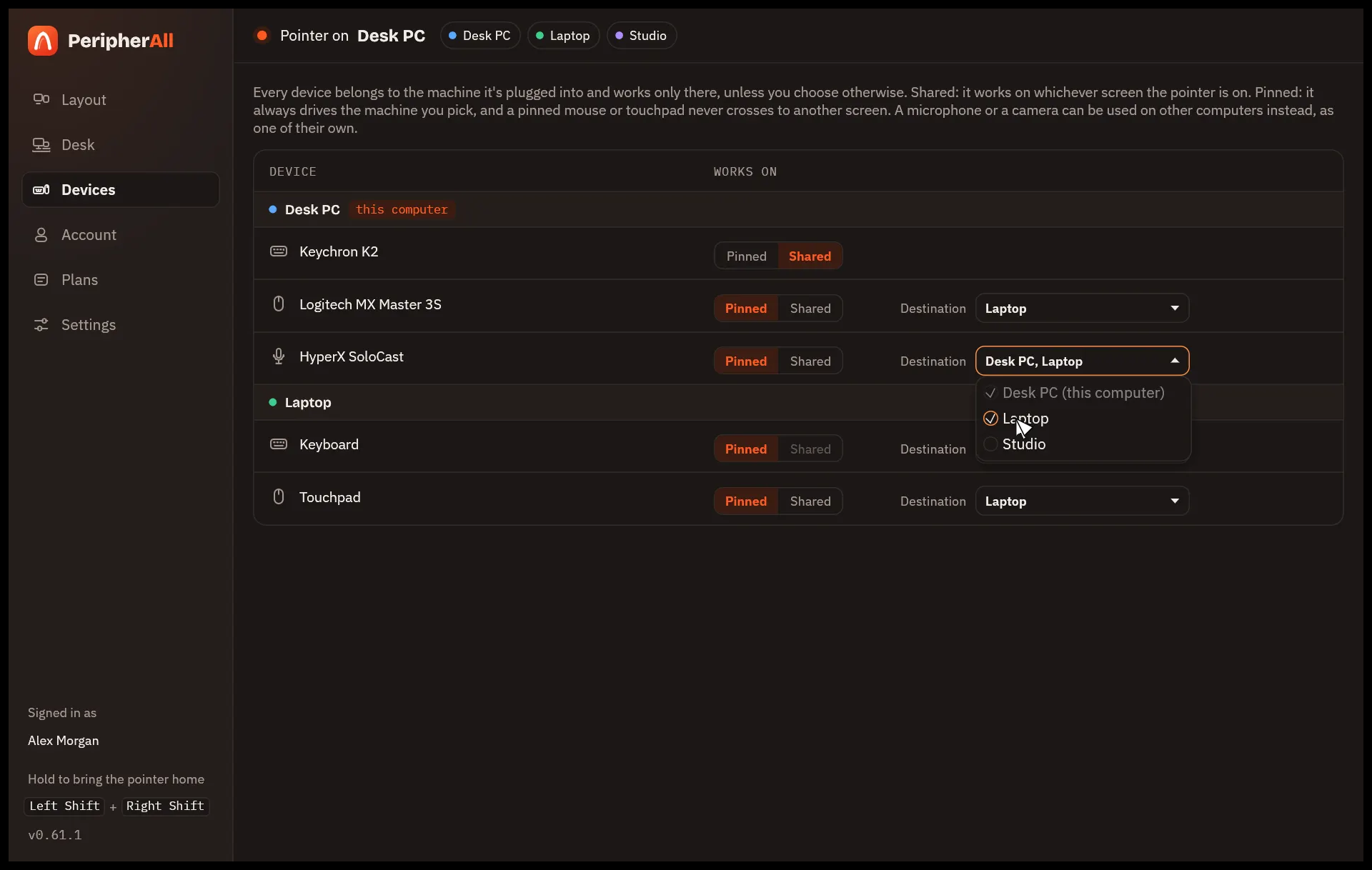
01 · Devices

Decide what goes where.

Every keyboard, mouse and microphone, from every computer, in one list. Each one does exactly what you choose.

  • Shared: it follows the pointer from screen to screen.
  • Pinned: it always drives the computer you pick.
  • A microphone on one computer, used by the others at once.
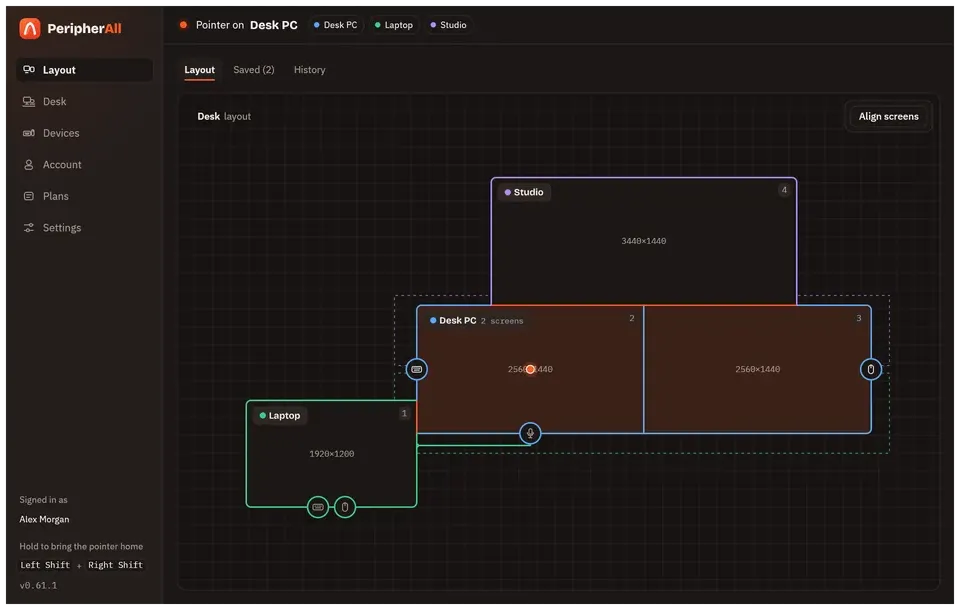
02 · Layout

Your desk, drawn to scale.

Drag the screens to match where they really stand, and the pointer crosses exactly where their edges meet.

  • Dual-boot computers share one spot.
  • Save layouts by name, like Desk and Sofa, and switch in a click.
  • Every change can be undone.

03 · Align

Line screens up by pointing.

Pick two screens, click where they should meet on each one, and PeripherAll joins them right there, at the same height.

  • Each computer uses its own mouse meanwhile.
  • A short how-to shows the first time.

04 · Your desk

Sign in, and join your desk.

Sign in with Google on each computer: the first starts your desk, and the others find it on your network and join. Only your own computers, and only yours.

  • What you type and copy goes directly between your computers, no server in between.
  • A desk reached over a VPN joins the same way.

05 · Settings

Tuned to your hands.

How fast the pointer moves on each screen, which shortcuts are on, whether the clipboard crosses: a few settings, all in plain words.

  • Updates install on their own.
  • Light and dark, like the system.

Clipboard and files

Copy here. Paste there.

The clipboard crosses with you: text, images, formatted text and whole folders. Nothing moves until you paste, and big files keep going in the background.

Any size, any format

Copy on one computer and paste on another, as if they were one. Turn it off for any computer that should keep its clipboard to itself.

Files and folders, too

Paste them in the other computer's file manager. Big ones move without slowing the pointer and pick up where they stopped.

Shortcuts

Keys for everything.

Your hands never have to leave the keyboard. Keys travel as the physical keys they are, so every layout, accent and dead key types just like on the computer itself.

Bring the pointer home

Hold both, on any computer, and the pointer comes back to it.

Jump to a computer

Straight to computer 1 to 9, numbered by their place on your desk. Add L to lock the pointer where it is.

Find the pointer

A tap of Right Ctrl rings the pointer, on whichever screen it's hiding.

Private by design

Direct, encrypted, yours.

No cloud in between

Your computers talk to each other directly over your own network. What you type, copy and move never goes through a server.

Your desk, pinned

Each computer has its own key, tied to its machine. Your computers only trust the keys your desk lists, signed for you, and nothing else.

Encrypted end to end

Every keystroke, pointer move and paste travels encrypted, from one of your computers to another, and nowhere else.

Your whole desk.
One pointer.

PeripherAll is almost ready, for Windows, Ubuntu and macOS.

Windows 10 and 11Ubuntu 24.04 and 26.04 (Wayland)macOS 27